Python-UNO bridge
IMPORTANT: Workarounds for pyuno problems in OOo3.0.0
There are some problems with pyuno in OOo3.0.0 (in particular with the python executable). Here the known problems and the workarounds for the moment .- (windows only) The python scripting framework (scripts within openoffice via Extras/Macro/) does not work, when you have a python 2.3 installed on your windows system (more precisly, when there exists a python23.dll in your windows/system32 directory). You can work around it for now by copying Basis\program\python23.dll to program\. beside the soffice.bin executable. This forces the soffice process to load the correct library beside the office process. (94993)
- (windows only) When you try to connect to a running office process, you get
__main__.com.sun.star.connection.NoConnectException: Connector couldn't connect to socket (WSANOTINITIALISED, WSAStartup() has not been called)
You can workaround this, by placing a
in the top of your script (95028)import socket
- (windows only) The python program crashes or you get an attribute error
AttributeError: getCurrentComponent (or some other attribute)
This is because the types could not be loaded due to changes in the uno bootstrapping mechanism. You can work around it for now by setting the URE_BOOTSTRAP variable (adapt to your installation path, replace every space with a %20, change \ to /).
and run python. Alternatively, you can set URE_BOOTSTRAP=fundamental.ini when your current working directory is beside the python executable. (95024)set URE_BOOTSTRAP=file:///C:/Program%20Files/OpenOffice.org%203/program/fundamental.ini
- (windows only) Interactive mode in python does not work correctly When you start the python executable without parameters, the interactive session runs somewhat fuzzy (at least on my machine). When you get the prompt >>>> , everything you type will be interpreted as a shell command. When you then just press return, you are prompted with your current working directory, here you can place a python command, so in short, you have to press return 2 times after every python command (95037).
- ( unix only), you need to set LD_LIBRARY_PATH correctly before starting the python executable, eg.
  export set LD_LIBRARY_PATH=$LD_LIBRARY_PATH:../../openoffice.org/ure/lib:../../openoffice.org/basis3.0/program
  ./python
Contents
- Translations- Introduction
- Download
- State
- Tutorial
-- PyUNO Installation
-- PyUNO Bridge Modes
-- More examples
- UNO language binding
-- UNO type mapping
-- Implementing UNO objects
-- Implementing UNO components
-- Out parameter handling
-- Exception handling
-- current context support (since OOo 2.0.2)
-- unohelper module
-- logging (since OOo 2.0.2)
-- Implementing UNO components with multiple source files (since OOo 2.4)
- Dependencies
- Bootstrapping in non-OOo environments
- Replacing the python runtime
- Regressiontests
- External references
- FAQ (read this FIRST when you have problems)
- Known pyuno extensions for OOo
- PyUNO needs you !
- Authors
- License
Translations
Find here a shortened Spanish version of this document.
Introduction
The Python-UNO bridge allows to
- use the standard OpenOffice.org API from the well known python scripting language.
- to develop UNO components in python, thus python UNO components may be run within the OpenOffice.org process and can be called from Java, C++ or the built in StarBasic scripting language.
- create and invoke scripts with the office scripting framework (OOo 2.0 and later).
You can find the most current version of this document from http://udk.openoffice.org/python/python-bridge.html
Download
You can also download this documentation for offline work.
Download pyuno-doc.zip ( less than 0.5 MB).
State
The Python-UNO bridge is feature complete, but has not been used extensively, so it may contain some bugs. It is now integrated in the OpenOffice.org source trees. (OpenOffice.org 1.0.x is not supported.)
The documentation in its current state is targeted at developers who have already some experience with OpenOffice.org API and with some other programming language (Java/C++/StarBasic). It is recommended that you read that some background information from the developer manual before looking at the specifics of python.
PyUNO tutorial for OpenOffice.org
This tutorial shows, how the PyUNO bridge can be used to automate OpenOffice.org. This is not an OpenOffice.org tutorial, there is lots of resources available in the office development kit and the developer manual.PyUNO Installation
Since OpenOffice1.1, PyUNO is included in the default installation.PyUNO bridge modes
PyUNO can be used in three different modes:
- Inside the OpenOffice.org process within the scripting framework (OOo 2.0 and later only !!),
- Inside the python executable (and outside the OOo process)
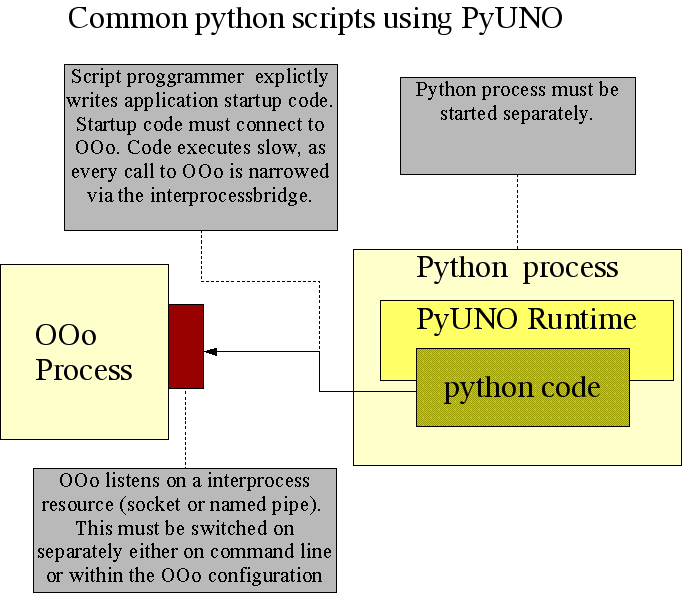
Use this mode, when you
- begin to use PyUNO (as it is the more intuitive approach).
- want to trigger script execution by starting a separate process (e.g. a cgi-script within a http-server).
- want the shortest turnaround times (code - execute - code - execute ...)
Hello World
Make sure, that OpenOffice.org is not running (note that on windows you must also terminate the quick starter in the system tray at the right bottom of your desktop). Start a system shell ( cmd on Win NT/2000/XP, command on Win9x, tcsh or bash on Unix). Switch to the Office program directory (e.g. C:\Program Files\OpenOffice.org1.1\program ) and start the office with the following command line parameters
c:\Program Files\OpenOffice1.1\program> soffice "-accept=socket,host=localhost,port=2002;urp;"
Now use your favourite text editor to create the following hello_world.py sample program:
import socket  # only needed on win32-OOo3.0.0
import uno

# get the uno component context from the PyUNO runtime
localContext = uno.getComponentContext()

# create the UnoUrlResolver
resolver = localContext.ServiceManager.createInstanceWithContext(
				"com.sun.star.bridge.UnoUrlResolver", localContext )

# connect to the running office
ctx = resolver.resolve( "uno:socket,host=localhost,port=2002;urp;StarOffice.ComponentContext" )
smgr = ctx.ServiceManager

# get the central desktop object
desktop = smgr.createInstanceWithContext( "com.sun.star.frame.Desktop",ctx)

# access the current writer document
model = desktop.getCurrentComponent()

# access the document's text property
text = model.Text

# create a cursor
cursor = text.createTextCursor()

# insert the text into the document
text.insertString( cursor, "Hello World", 0 )

# Do a nasty thing before exiting the python process. In case the
# last call is a oneway call (e.g. see idl-spec of insertString),
# it must be forced out of the remote-bridge caches before python
# exits the process. Otherwise, the oneway call may or may not reach
# the target object.
# I do this here by calling a cheap synchronous call (getPropertyValue).
ctx.ServiceManager
Now start the above script with the python script located in the program directory
Note: You must use the script/batch file in the program directory to start python, simply starting the python executable in the runtime directory (or from python installation installed somewhere else on your machine) will not work.c:\Program Files\OpenOffice1.1\program> .\python hello_world.py
This scripts prints "Hello World" into the current writer document.
Inside the OpenOffice.org (OOo) process
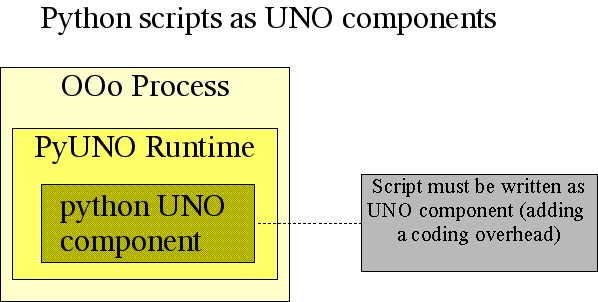
Use this mode, when
- you want to easily roll out your code to multiple other machines (using UNO packages)
- your scripts shall get triggered by UI events (menu or toolbars)
- you have collected some experience with PyUNO
- you want your script to run with the best performance
Hello World
The above Hello World example is now recoded as a python UNO component, which means, that the code that does the insertion needs to be embedded in a python class. Additionally, the connecting-to-the-office-code needs to be replaced by a distinct entry point, which is used by the python loader to instantiate the python class.hello_world_comp.py:import uno import unohelper from com.sun.star.task import XJobExecutor # implement a UNO component by deriving from the standard unohelper.Base class # and from the interface(s) you want to implement. class HelloWorldJob( unohelper.Base, XJobExecutor ): def __init__( self, ctx ): # store the component context for later use self.ctx = ctx def trigger( self, args ): # note: args[0] == "HelloWorld", see below config settings # retrieve the desktop object desktop = self.ctx.ServiceManager.createInstanceWithContext( "com.sun.star.frame.Desktop", self.ctx ) # get current document model model = desktop.getCurrentComponent() # access the document's text property text = model.Text # create a cursor cursor = text.createTextCursor() # insert the text into the document text.insertString( cursor, "Hello World", 0 ) # pythonloader looks for a static g_ImplementationHelper variable g_ImplementationHelper = unohelper.ImplementationHelper() # g_ImplementationHelper.addImplementation( \ HelloWorldJob, # UNO object class "org.openoffice.comp.pyuno.demo.HelloWorld", # implementation name # Change this name for your own # script ("com.sun.star.task.Job",),) # list of implemented services # (the only service)The code needs to be linked to a user event. This can be done e.g. with the following configuration settings :
Addons.xcu:<?xml version="1.0" encoding="UTF-8"?> <oor:node xmlns:oor="http://openoffice.org/2001/registry" xmlns:xs="http://www.w3.org/2001/XMLSchema" oor:name="Addons" oor:package="org.openoffice.Office"> <node oor:name="AddonUI"> <node oor:name="AddonMenu"> <node oor:name="org.openoffice.comp.pyuno.demo.HelloWorld" oor:op="replace"> <prop oor:name="URL" oor:type="xs:string"> <value>service:org.openoffice.comp.pyuno.demo.HelloWorld?insert</value> </prop> <prop oor:name="ImageIdentifier" oor:type="xs:string"> <value>private:image/3216</value> </prop> <prop oor:name="Title" oor:type="xs:string"> <value xml:lang="en-US">Insert Hello World</value> </prop> </node> </node> </node> </oor:node>Both files must be packaged up into a single zip file by using your favourite zip utility, e.g. infozip.
zip hello_world.zip Addons.xcu hello_world_comp.py
  adding: Addons.xcu (deflated 55%)
  adding: hello_world_comp.py (deflated 55%)
This package can then be deployed into an OpenOffice.org installation using the
pkgchktool, which is located in the OOo program directory. Note, that the office must have been stopped before installing the package.Note: Make sure, that the PYTHONPATH environment variable is NOT set when you start pkgchk or soffice (see #i17339#). This may require, that you create a batch file for soffice on windows, unset PYTHONPATH in the system configuration or always start soffice from the shell with set PYTHONPATH= (windows) or unsetenv PYTHONPATH (Unix tcsh shell).
c:\Program Files\OpenOffice.org1.1\program> pkgchk hello_world.zip
c:\Program Files\OpenOffice.org1.1\program>
On success no output is given by the tool. When OpenOffice.org starts there is a new menu entry (see
Tools/Additional Components/Insert Hello World).
Examples
ooextract.py
A command line tool, that extracts the text, html or pdf content from a StarWriter document and writes it to a different file or (optionally) prints it to stdout (grep your office documents).oomerge.py
A command line tool, that creates a new document by appending multiple single documentsswriter.py
A command line program, that fills a writer document with some text and tables.- swritercomp.py,
swritercompclient.py
Same as above, but implemented as a python UNO component, so that it runs within the office process. This shows the performance benefit of having scripts run within one process.You must add the swritercomp.py program with the pkgchk tool (see below) to the office installation and can then use the swritercomp_client.py program to execute it.
biblioaccess.py
A command line program, that displays the contents of the biblio sample database that comes with OpenOffice.org.python-tokencounter-calc-addin.oxt
Adds a function namedtokencount
to calc, which counts the number of words within a calc cell. After adding the extension, the office must be restarted (including terminating the quickstarter) to make the function appear in the function list.- Your example (Please send more examples, so that they can be added here).
UNO Language binding
In the following you find the full description about how UNO features are mapped to the python language.UNO Type mapping
| IDL datatype | representation in python | |||
|---|---|---|---|---|
| integer types (byte, short, unsigned short, long, unsigned long, hyper, unsigned hyper |
Python internally knows only the C datatypes long and long long as integer types.
On most machines, a long is a 32 bit value while long long is a 64 bit value.
|
|||
| boolean | Python internally has a boolean data type, which is derived from the
integer type ( see
http://python.org/peps/pep-0285.html
). There exists the singletons True and
False, which pyuno uses to distinguish between integers
and boolean values.
As long as a boolean is specified in the interface method signature, you may also use numbers. In the following example, all calls are valid:
However, when you want to explicitly pass a boolean, where only
an any is specified, you must use
Note: There also exists the uno.Bool class, which has been deprecated since pyuno 0.9.2, but still supported. Don't use it anymore. | |||
| string | In general, the string is mapped to the python Unicode string. However, you may pass an 8 bit python string where a UNO string is expected, the bridge converts the 8 bit string to a Unicode string using the system locale.
|
|||
| char |
A char is mapped to a
|
|||
| enum | A concrete enum value is represented by an instance of the class uno.Enum. It has
two members, typeName is a string containing the name of the enum type and
value contains the value of the enum.
You may create concrete enum values in two ways
|
|||
| type | A type is mapped to a uno.Type. It has public members typeName (string) and
typeClass (enum value of com.sun.star.uno.TypeClass).
There exists a function uno.getTypeByName() to easily
create a type instance, the functions raises a RuntimeException in case the
type is unknown.
You may create concrete type values in two ways
|
|||
| struct (and exception) |
For each UNO struct (or exception), a new python class is generated on the fly. It
is guaranteed, that there is only one instance of the struct (or exception) class per
python interpreter instance. The generated class does reflect the inheritance
hierarchy of the concrete UNO type (e.g. important for exception handling, see below).
One can generate a struct class by using the import mechanism. An instance of a struct can then be instantiated by using the python constructor. The constructor supports zero arguments (members get default constructed), 1 argument which the same type (copy constructor), and n arguments, where n is the number of elements of the concrete struct. The struct supports the equality operator, two structs are equal, if they are of the same type and each member is equal. Example:
uno.createUnoStruct() and passing the name of the struct
as the first parameter and optional constructor arguments (see above for
an example of possible ctors).
ATTENTION: In UNO, structs have value semantic, however the handling in python does not reflect this. When a struct gets passed as a parameter to a function, the values are passed to the callee. Later modification of the struct instance does not influence the callee anymore. However, simply assigning a struct to another local variable does not create a copy, but simply creates an alias to the original instance.
|
|||
| sequence | A sequence is in general mapped to a python tuple. A python list is not (!)
accepted.
Attention (since 0.9.2): The idl
|
|||
| constants | An UNO idl constant can be given by the following ways:
|
|||
| any | In general, the python programmer does not come into touch with anys. At all places
where anys appear in method signatures, the python programmer can simply pass a concrete
value. Consequently, return values or out parameters also never contain a concrete any.
However, there are certain circumstances, where a python programmer may want to pass a concrete typed value to a callee (note, this is only possible for 'bridged' calls, you can't pass a typed any to another python uno object). You can create a
These anys can only be used in conjunction with the
sequence<short>.
When obj is a local python object, it gets simply the (4,5) as it would have
got it with the normal call.
NOTE: There is currently a bug in pyuno (see #i31159#), which does not let you fill anys into structs (e.g. a PropertyValue struct contains an any). You can workaround this with the following code sample:
before(com.sun.star.beans.PropertyValue){ Name = (string)"TabStopPosition", Handle = (long)0x0, Value = (any){ (byte)0x64 }, State = (com.sun.star.beans.PropertyState)DIRECT_VALUE } after(com.sun.star.beans.PropertyValue){ Name = (string)"TabStopPosition", Handle = (long)0x0, Value = (any){ (long)0x64 }, State = (com.sun.star.beans.PropertyState)DIRECT_VALUE } |
Implementing UNO objects
One may use python classes to implement UNO objects. Instances of a python class may then be passed as argument to UNO calls where anys or concrete interfaces are specified.To be an UNO object, a python class MUST implement the com.sun.star.lang.XTypeProvider interface by implementing two methods getTypes() and getImplementationId(), which inform the python-UNO bridge, which concrete UNO interfaces the python class implements. The getTypes() function defines, which interfaces are implemented by the class.
To make this easier, there exists a unohelper.Base class, where
a python UNO object should derive from. You can then implement a UNO interface
simply by deriving from the wanted interfaces. The following example
implements a com.sun.star.io.XOutputStream, which stores
all data written into the stream within a ByteSequence. (Note that this is
quite a poor implementation, which is just for demonstration purposes).
import unohelper
from com.sun.star.io import XOutputStream
class SequenceOutputStream( unohelper.Base, XOutputStream ):
      def __init__( self ):
          self.s = uno.ByteSequence("")
          self.closed = 0

      def closeOutput(self):
          self.closed = 1

      def writeBytes( self, seq ):
          self.s = self.s + seq

      def flush( self ):
          pass

      def getSequence( self ):
          return self.s
|
Implementing Python UNO components
There exists a loader for python components. It allows to create instances of python classes not just within the python process but in every arbitrary UNO process including OpenOffice.org. The python loader loads the python runtime on demand if it is not already loaded and executes python code within the root python interpreter.
If the reader is unfamiliar with the component registration process, it should visit the OpenOffice.org developer manual for a comprehensive explanation.
The python loader currently supports the following protocols for incoming urls :
| Protocol name | Description |
|---|---|
| vnd.openoffice.pymodule | The protocol dependent part is interpreted as a python module name, which is imported
using the common python import mechanism (which uses the PYTHONPATH environment variable).
Example: The given module is added to the |
| file | A mandatory absolute file url to a python component file.
The file itself does not need to be contained within PYTHONPATH, but it may
only import files, which are contained within PYTHONPATH.
The module is not added to sys.modules.
Example: Since OOo 2.4.x, you can import self written python files from your component (see the multiple source file chapter ) |
| vnd.sun.star.expand | The python loader supports the common macro expansion mechanisms as the Java or
C++ loader does.
Example: |
After the module has been imported, the python loader looks for a module-global variable
with the name g_ImplementationHelper, which is expected to be an instance
of unohelper.ImplementationHelper.
The following sample code makes a uno component out of the above UNO object
( note that the component is not useful, because there is no UNO method to retrieve
the tuple nor does a com.sun.star.io.OutputStream service specification exist, it's just here
as an example).
import unohelper
from com.sun.star.io import XOutputStream

g_ImplementationHelper = unohelper.ImplementationHelper()

class TupleOutputStream( unohelper.Base, XOutputStream ):
      # The component must have a ctor with the component context as argument.
      def __init__( self, ctx ):
	  self.t = ()
	  self.closed = 0

      # idl void closeOutput();
      def closeOutput(self):
	  self.closed = 1

      # idl void writeBytes( [in] sequence<byte>seq );
      def writeBytes( self, seq ):
	  self.t = self.t + seq      # simply add the incoming tuple to the member

      # idl void flush();
      def flush( self ):
	  pass

      # convenience function to retrieve the tuple later (no UNO function, may
      # only be called from python )
      def getTuple( self ):
	  return self.t

# add the TupleOutputStream class to the implementation container,
# which the loader uses to register/instantiate the component.
g_ImplementationHelper.addImplementation( \
	TupleOutputStream,"org.openoffice.pyuno.PythonOutputStream",
	                    ("com.sun.star.io.OutputStream",),)
|
regcomp -register -br types.rdb -br services.rdb -r services.rdb -c vnd.openoffice.pymodule:tuplestrm
You can of course also use the pkgchk tool as explained in the tutorial chapter with
pkgchk tuplestrm.py
, but note, that this command creates a copy of the file (when the script changes,it must be redeployed using the above command).
The component can be instantiated e.g. from OpenOffice.org Basic with
tupleStrm = createUnoService( "com.sun.star.io.OutputStream" ) tupleStrm.flush() |
Out parameter handling
UNO out parameters are handled through the python multiple return value
feature. For
pure outparameters, a dummy None value should be used as a place holder.
This is best explained with an example.
Lets' assume we have the following IDL method spec
long foo( [in] long first, [inout] long second, [out] third ) |
A python UNO object implements such a method the following way:
class Dummy( XFoo ):
    def foo( self, first,second,third):
        # Note: the value of third is always None, but it must be there
	#       as a placeholder if more args would follow !
        return first,2*second,second + first
|
ret,second,third = unoObject.foo( 2, 5 , None ) print ret,second,third # results into 2,10,7 |
This also emphasizes, that out-parameters are quite close to multiple return values (though the semantic association of a inout parameter gets lost).
However, note that
- you must have the correct number of return values either in the calling and
implementing code, otherwise you will get a
RuntimeExceptionduring the call. - a void method always returns a
Nonefollowed by possible out parameters, so when you have a void method with one out parameter you must assign the output to two variables (though the first one will always be None). - a python object implementing a void method with out parameters MUST always
return
Noneas the first parameter.
Exception handling
The Python-UNO bridge uses the common Python exception handling mechanism. For every UNO exception, a concrete exception class is generated on the fly (see above type mapping table for an explanation how to do this).Example for catching
from com.sun.star.uno  import RuntimeException
from com.sun.star.lang import IllegalArgumentException
from com.sun.star.connection import NoConnectException
try:
    uuresoler.resolve( "uno:socket,host=localhost,port=2002;urp;StarOffice.ComponentContext" )
except NoConnectException e:
    print "The OpenOffice.org process is not started or does not listen on the resource ("+e.Message+")"
except IllegalArgumentException e:
    print "The url is invalid ( "+ e.Message+ ")"
except RuntimeException e:
    print "An unknown error occurred: " + e.Message
|
Example for throwing
from com.sun.star.io import IOException
class TupleOutputStream(XOutputStream,unohelper.Base):
      def writeBytes( self, seq ):
          if self.closed:
	     raise IOException( "Output stream already closed", self )
          self.t = self.t + seq
|
current context support
NEW SINCE OOo 2.0.2pyuno supports the uno current context concept. There exist the functions uno.getCurrentContext() und uno.setCurrentContext( newContext ).
Furthermore, there exists a class unohelper.CurrentContext. The constructor accepts a hashmap with name/value pairs and the former context for delegation. Usage pattern:
   oldContext = uno.getCurrentContext()
   try:
      uno.setCurrentContext(
          unohelper.CurrentContext( oldContext,{"My42":42}) )

      # ... do some uno calls, which may interpret the "My42"
   finally:
      uno.setCurrentContext( oldContext )
|
unohelper module
The unohelper.py module contains some extra functions/classes, which are nice to use with pyuno, but not mandatory. This paragraph lists some of the unohelper.py features.
def systemPathToFileUrl( systemPath )
|
Returns a file-url for the given system path. Most of the OOo API functions
expect a file-url, while the python runtime functions in general only work
with system paths. The function is implemented using the core C function
osl_getFileUrlFromSystemPath().
|
def fileUrlToSystemPath( url ) |
Returns a system path (determined by the system, the python interpreter
is running on). Most OOo function return a file-url, while most python
runtime functions expect system paths. The function is implemented by
using the core osl_getSystemPathFromFileUrl() function.
|
def absolutize( path, relativeUrl )
|
Returns an absolute file url from a given, mandatory absolute, directory url
and a relative file url, which may be absolute or relative (which includes
e.g. ../ parts. The function is implemented by using the core
osl_getAbsolutePathFromFileUrl() function.
|
| def addComponentsToContext( toBeExtendedContext, contextRuntime, componentUrls, loaderName ) |
This functions adds a tuple of component urls
to the
toBeExtendedContext using the contextRuntime to
instantiate the loader loaderName and some other services needed for this
task. After completing the function, all services within these components
can be instantiated as long as the toBeExtendedContext is
not disposed. The changes are not made persistent.
|
def inspect( unoobject, file )
|
Dumps the typeinformation about the given UNO object into a file (in fact, file needs to be an instance of a class, that implements a write method). The typeinformation include implementation name, supported services, supported interfaces, supported methods and supported properties. |
Logging
NEW SINCE OOo 2.0.2The pyuno bridge can now log every call bridged between python and uno. This may be a useful help when you need to debug or profile your code. There are two environment variables, which activate logging:
| PYUNO_LOGLEVEL |
Valid values are
|
| PYUNO_LOGTARGET |
|
(Since OOo 2.4) Implementing UNO components with multiple source files
Before the pythonloader tries to load a new python unocomponent, it looks beside the uno component for a file with the name pythonpath.zip or a directory named pythonpath . If it exists, it puts it into sys.path (if it is not already in there) and then tries to load the given component. Note, that the unocomponent file itself is not within PYTHONPATH and thus cannot be reimported by other modules.This now means that python uno components can be implemented with an arbirtrary number of python source files which can be deployed/undeployed via the uno package mechanism. It also means, that you can now use the unohelper.Base implementation even if you have defined your own interface types (by lazy loading the new types so that they don't get used during registration process).
import uno
import unohelper

def createInstance( ctx ):
    # pythonpath/org/openoffice/comp/addin/sample/python/tokencounter.py contains the component implementation
    # TokenCounter uses a new type, importing it at the top of this file
    # leads to a failure during adding the extension to OOo. createInstance does not get called
    # during registration
    import org.openoffice.comp.addin.sample.python.tokencounter
    return org.openoffice.comp.addin.sample.python.tokencounter.TokenCounter( ctx )

# pythonloader looks for a static g_ImplementationHelper variable
g_ImplementationHelper = unohelper.ImplementationHelper()
g_ImplementationHelper.addImplementation( \
	createInstance,"org.openoffice.comp.addin.sample.python.TokenCounter",
        ("com.sun.star.sheet.AddIn",),)
|
Have a look at the sample calc addin to see how it works.
Note that there are some negative side effects:
- code added through this mechanism can only be changed with a restart of the office process (as it got added to sys.modules). This is especially limitation for script developers.
- two independend uno packages from different developers may interfere each other, when they have name clashes in their code (e.g. same 3rd party product, but different versions).
- if such a situation occurs, in general the last used component will not work properly (which one is the last used component may also depend on the path of user interactions in the office process)
Dependencies
This chapter is most interesting for people who want to use the Python-UNO bridge independently from OpenOffice.org.
Unlike the Java or C++ UNO binding, the python UNO binding is not self contained. It requires the C++ UNO binding and additional scripting components. These additional components currently live in the shared libraries typeconverter.uno, invocation.uno, corereflection.uno, introspection.uno, invocadapt.uno, proxyfac.uno, pythonloader.uno (on windows typeconverter.uno.dll,...; unix typeconverter.uno.so,...).
Often, the components for setting up an interprocess connection are also required. These are uuresolver.uno, connector.uno, remotebridge.uno, bridgefac.uno shared libraries.
The path environment variables ( LD_LIBRARY_PATH on Unix, PATH on Windows) must point to a directory, where the core UNO libraries, the above listed components and the pyuno shared library is located. (On Unix, there exists two files: libpyuno.so containing the code and a pyuno.so which is needed for importing a native python module). Additionally, the python module uno.py, unohelper.py and pythonloader.py must be located in a directory, which is listed in the PYTHONPATH environment variable.
Bootstrapping pyuno from the python executable
When the uno module gets first imported from an arbitrary python script, it must bootstrap a properly prepared UNO component context.
# bootstraps the uno component context import uno # retrieve the already bootstrapped component context unoContext = uno.getComponentContext() |
As the python programmer can't (and probably doesn't want to) give parameters while importing a module, the python-uno binding uses the pyuno[rc|.ini] file located beside the pyuno shared library to bootstrap the UNO context (see uno bootstrap variable concept). The bootstrap variables UNO_SERVICES must point to a registry file where the components, given above, were registered.
PYUNOLIBDIR is a special bootstrap variable, which contains the path to the currently used pyuno shared library. Example:
# The bootstrap variable PYUNOLIBDIR will be set by the pyuno runtime library UNO_TYPES=$PYUNOLIBDIR/types.rdb UNO_SERVICES=$PYUNOLIBDIR/pyuno_services.rdb |
If the above preconditions are fulfilled, the script can simply be started with
$ python myscript.py
Sometimes it is preferable to mention the librarynames of the desired
components directly within the script instead of preparing a registry
(however note that the above mentioned bootstrap components always needs
to be registered in a registry).
This can be achieved by using the function
unohelper.addComponentsToContext(
       toBeExtendedContext, contextRuntime, componentUrls, loaderName )
Example:
import uno
import unohelper

localContext = uno.getComponentContext()

unohelper.addComponentsToContext(
       localContext, localContext, ("streams.uno",),
       "com.sun.star.loader.SharedLibrary")

pipe = localContext.ServiceManager.createInstanceWithContext(
              "com.sun.star.io.Pipe", localContext )

pipe.writeBytes( uno.ByteSequence( "abc" ) )
ret,seq = pipe.readBytes( None, 3 )
|
Replacing the python runtime with your system's python installation
OOo by default ships with the Python-2.2.2 core runtime. This is fine for most users, but some hackers (or Linux distributors) may want to replace the runtime with the python system's installation, which may contain more optional packages that you want to use in python.The replacement is a little complicated however you just need an installed python and office.
Windows
On windows, you can only use python-2.2. If you want to use python-2.3, you must recompile the pyuno module with python-2.3 (see below)
- Install OpenOffice.org
- Install python 2.2
- Use your favourite text editor (e.g. notepad) to open the file
OpenOffice.org/program/pythonloader.uno.ini and modify the lines there to something
like
[Bootstrap]
PYTHONHOME=file:///c:/python-2.3.4
PYTHONPATH=$PYTHONHOME/lib $ORIGIN
The path elements must be entered as absolute file urls (note that you need to escape using url syntax, for example a space is represented by %20). The PYTHONPATH must point to the root python library location and to OOo program directory. Add other libraries as you need them ( space separated). - Rename the following files and directories in the OpenOffice.org/program directory
to something else (e.g. add a .orig suffix)
- python.bat
- python22.dll
- python-core-2.2.2
- Start a cmd shell and add to the PATH variable both to python home directory and OpenOffice.org/program directory
- Add to the PYTHONPATH environment variable the OpenOffice.org/program directory
Linux
On Linux, you can use both use python-2.2 or python 2.3, but when using the latter, you get a warning on stderr (informing you about the version mismatch) when starting python or the office, to avoid the warning, you need to rebuild pyuno with python-2.3 (see below), however I haven't noticed any difficulties because of the version mismatch.
- You need a python configured with the --enable-shared option. When
OOo and python were not built with the same gcc compiler version,
you also need to rebuild python, because the default python uses some bad
switches during linking.
To rebuild do
LINKCC=gcc
export LINKCC
./configure --enable-shared
make
su -c "make install"
- Switch to the OpenOffice.org directory and move away the python
runtime coming with OOo.
cd /path/to/openoffice.org/program
mv libpython.so.2 libpython.so.2.orig
mv python-core python-core.orig
cp pythonloader.unorc pythonloader.unorc.orig
ln -s /usr/local/lib/libpython2.3.so.1.0 libpython.so.2
- Add the office/program directory to the LD_LIBRARY_PATH and PYTHONPATH variable.
-
Create the file pythonloader.unorc in the office/program directory.
[Bootstrap]
PYTHONHOME=file:///usr/local
PYTHONPATH=$PYTHONHOME/lib/python2.3 $ORIGIN
The path elements must be entered as absolute file urls (note that you need to use URL escape sequences for example replacing spaces with a %20). The PYTHONPATH must point to the root python library location and to OOo program directory. Add other libraries as you need them (space separated).
Testing
You should now be able to start system's python and type 'import uno'. If this works fine, use pkgchk to deploy your script, for example the above swritercomp.py in OpenOffice.org (Tip: add a print sys.version to it). If this works fine, python should work well in OpenOffice.org itself.I did only some rudimentary tests, but I didn't notice any significant problems. Let us know, if you have some.
Note that the Bibus project uses an extended python 2.2.2 with the wxPython/wxWindows extension for the GUI.
Rebuilding pyuno
You'll need to install OOo buildenv to do this. In the shell, replace the the PYTHONPATH variable properly, e.g.setenv PYTHONPATH /usr/local/lib/python2.3:.:/usr/local/lib/python2.3/lib-dynloadMake sure, that system's python is in the PATH variable. Build the office (or at least all components, pyuno depends on) but leave out the python module. In the pyuno module itself, you should only build pyuno/source/module, pyuno/source/loader and pyuno/test, leave out the zipcore directory. You'll need to modify the pyuno/source/module/makefile.mk and pyuno/source/loader/makefile.mk. Replace the CFLAGS+= line with CFLAGS+=-I/usr/local/include/python2.3 and all occurrences of -lpython with -lpython2.3.
When the test runs fine, you can now replace pyuno.so, libpyuno.so and pythonloader.uno.so in the office with your rebuilt version.
Regressiontests
In case you have modified python or pyuno, you should at least run the following regression tests.- Build testtools module and run
cd testtools/source/bridgetest/pyuno && dmake runtest
- Build installation sets and install openoffice.
- Start program/python and type
import uno
(should work without any errors). - Start the office and add the pyuno_hello_world.zip from the above pyuno-doc.zip by using Tools/Package Manager.
- Start Tools/Macros/Run macro/OpenOffice.org Macros/pythonSamples/TableSample/createTable
External references
| Python homepage | http://www.python.org |
| The OpenOffice.org component model | http://udk.openoffice.org |
| OpenOffice.org developer manual | http://api.openoffice.org/DevelopersGuide/DevelopersGuide.html |
Frequently Asked Questions
-
Why do I get a 'bus error' when starting the hello-world-script on Solaris ?
There seems to be a corrupted version of the libpyuno.so in the OpenOffice.org1.1.0 installation set. The reason is not yet clear, might be either a bug in pyuno code or a build error. Please download libpyuno.so.gz to patch OOo1.1.0 version (do not apply this patch on any other version than OOo1.1.0 Solaris sparc!). -
Why do I get a 'SystemError: pyuno runtime is not initialized, ...' when starting the script ?
- Pyuno was not installed correctly (OO1.1RC2 and earlier, fixed with RC3). Please check
<openoffice-install>/program $ ls -c1d py*pyunorc pythonloader.py pythonloader.unorc python python.sh python-core python-core-2.2.2 pythonloader.uno.so pyuno.soUnder certain circumstances, it may occur, that the following ini files are missingpyunorc (or pyuno.ini on windows):
[Bootstrap]
UNO_TYPES=$ORIGIN/types.rdb
UNO_SERVICES=$ORIGIN/services.rdb
pythonloader.unorc (or pythonloader.unorc on windows):
[Bootstrap]
PYTHONHOME=$ORIGIN/python-core
PYTHONPATH=$ORIGIN/python-core/lib $ORIGIN/python-core/lib/lib-dynload $ORIGIN
Simply cut and paste them into a text editor to create them.
- There have been reported some failures with the above error message, which have not been resolved yet. You may want to follow #i17339#.
- Pyuno was not installed correctly (OO1.1RC2 and earlier, fixed with RC3). Please check
-
Why do I get a 'SystemError: _PyImport_FixupExtension: module pyuno not loaded' when starting the script ?
This generally happens when you still start the system's python installation. OpenOffice.org ships a python installation (because python and the office must have been built with the identical compiler version). Please check this with 'which python'. Simply use OpenOffice.org's python with absolute path names, for example use /usr/local/OpenOffice.org1.1/program/python myscript.py. -
Why do I get a "error: python-loader:'No module named pythonloader'" when running pkgchk with a python component ?
Make sure to unset PYTHONPATH and PYTHONHOME (which you may have set, because you have another python installed on your system) environment variables before running soffice AND pkgchk. This is a workaround, We are currently thinking about a better solution. -
Why do I get an error message 'msvcr70.dll or python22.dll not found' when starting python ?
You probably try to start python from the exe not the bat file, for example, c:\program files\OpenOffice.org1.1\program\python-runtime\bin\python.exe, but you have to use c:\program files\OpenOffice.org1.1\program\python.bat.
(or Why do I get an 'error while loading shared libraries: libstdc++.so.x' ? ) -
Why do I get 'PYTHONPATH=... is not an identifier' when starting python ?
This is a bug in the python script which occurs with older bash shell versions. Simply use a text editor to change the following lines in the OOo-install/program/python.sh script
export PYTHONPATH="$sd_prog":"$sd_prog/python-core/lib":"$sd_prog/python-core/lib/lib-dynload":"$PYTHONPATH"
export PYTHONHOME="$sd_prog"/python-core
to
PYTHONPATH="$sd_prog":"$sd_prog/python-core/lib":"$sd_prog/python-core/lib/lib-dynload":"$PYTHONPATH"
export PYTHONPATH
PYTHONHOME="$sd_prog"/python-core
export PYTHONHOME
This bug is fixed with OOo 1.1.1.
-
I already have python installed on my system, why does the office ship another python ?
Python itself is shipped with OpenOffice.org, because
- python must have been compiled with the same C++ compiler as the office itself on all platforms that use the gcc compiler (e.g. Linux, BSD, etc.).
- On most Unix platforms, no python shared libraries are available by default (though some distributions do so). This would have meant, that python UNO components cannot be executed within the office process.
- Python component developers need a guaranteed minimum platform which they can rely on.
- Recognition of a python runtime at the installation system would have been an extremely difficult and time consuming task becausemany different python installation schemes exist.
- Packagers of OpenOffice.org will create their own packages, for example redhat or debian, without Python. The standard distribution must run on low end systems.
-
Can I use system's python installation ?
See here. -
Why does my UNO component crash OpenOffice.org, while the sample UNO component runs fine?
There is a known bug in the office, see #i13377#, which was not fixed for OpenOffice.org1.1. The office in general crashes, when a python script leads to an unhandled exception (for example an attribute error).You may try to workaround this bug by adding a
try: except:level in your trigger() implementation, which dumps an error message to stdout/stderr, but sadly this will not help in all cases (for example compilation failure for some reason, please follow the issue for further information).Of course, there may be other reasons for a crash, you will only know, when you try to retrieve a native callstack (for example by using gdb).
Why doesn't Python's xml parser (expat) or the zip module work for me?
These libraries don't yet get built for OOo1.1. This will change for OOo2.0. Alternatively you may use OpenOffice.org's xml parser service (see service com.sun.star.xml.sax.Parser) or the zip content provider (see http://ucb.openoffice.org).Why doesn't socket and sre module work in OOo1.1. python distribution on windows?
This is a known bug on windows in the OOo1.1 build. This should be fixed for OOo1.1.1 (see issue 21281 ). It should work for the other platforms. You can workaround this by downloading the official windows python distribution (see http://www.python.org) and replacing the appropriate .pyd files in the OOo's python installation.-
The samples are running fine, but how do I get more information about the API ?
The semantics of the OpenOffice.org API is a very complex topic, which can't be discussed in this python document. Try to gather information from other resources, especially from the developer manual (see below). -
Most examples in the devguide are in Java. How do I translate them to python code ?
Most sample code you find there is written in Java. It is easy to translate Java code to python,when you know the following differences:In python you don't need
queryInterface. E.g. Java code likeoInterface = (XInterface) oMSF.createInstance( "com.sun.star.frame.Desktop" ); oCLoader = ( XComponentLoader ) UnoRuntime.queryInterface( XComponentLoader.class, oInterface ); PropertyValue [] szEmptyArgs = new PropertyValue [0]; aDoc = oCLoader.loadComponentFromURL( "private:factory/swriter" , "_blank", 0, szEmptyArgs );becomes in python simply
            oCLoader = oMSF.createInstance( "com.sun.star.frame.Desktop" )
	    aDoc = oCLoader.loadComponentFromURL(
	                 "private:factory/swriter", "_blank", 0, () )
You don't need this intermediate oInterface variable anymore. So the python code simplifies the example a lot, with a little training, you shouldn't have too many problems to translating Java to python code.
-
Why can't I call the print method?
In python, 'print' is a statement. This basicly means there is no way to get a variable, method or anything else with this name. For example the below code does not work:doc = desktop.loadComponentFromURL(infileurl, "_blank", 0, ()) doc.storeAsURL(outfileurl, ()) doc.print(())You can workaround the problem by using theuno.invoke()function like below :uno.invoke(doc, "print", ((), ))
-
Why can't I do a replace on the 'NumberingRules' object ?
There are some places, where the loss in type safety leads to difficulties, as this issue shows http://www.openoffice.org/issues/show_bug.cgi?id=12504. The problem here is, that the C++ implementation within the office expects a
sequence< PropertyValue >, while the PyUNO runtime converts it to asequence< any>, where eachanycontains aPropertyValue. In my eyes, this is a bug within the C++ code. However here is a workaround for pyuno that the python scripter can use. See the sample below:import uno import unohelper localContext = uno.getComponentContext() resolver = localContext.ServiceManager.createInstanceWithContext( "com.sun.star.bridge.UnoUrlResolver", localContext) ctx = resolver.resolve( "uno:socket,host=localhost,port=2002;urp;StarOffice.ComponentContext") smgr= ctx.ServiceManager desktop = smgr.createInstanceWithContext("com.sun.star.frame.Desktop",ctx) doc = desktop.loadComponentFromURL("private:factory/swriter", "_blank", 0, ()) style = doc.createInstance("com.sun.star.style.NumberingStyle") family = doc.getStyleFamilies().getByName('NumberingStyles') family.insertByName('List test', style) rule = style.getPropertyValue('NumberingRules') level = rule.getByIndex(0) # the normal call would have been: # rule.replaceByIndex( 0, level ) # but this will end up in a exception # magic to pass the exact type to the callee uno.invoke( rule , "replaceByIndex", (0, uno.Any("[]com.sun.star.beans.PropertyValue",level)) )This is the only place, where the uno.Any is used. Using the uno.Any in normal calls will lead to RuntimeExceptions. A python uno object implementation will never receive an instance of uno.Any() as a incoming parameter, instead always the value within the is passed.
This solution looks really ugly, but it allows you to continue, where you otherwise could only give up or use to another implementation language.
-
How can I activate encoding iso8859-1 for OpenOffice.org's python installation ?
Put a file called sitecustomize.py somewhere in your PYTHONPATH containing:import sys sys.setdefaultencoding('iso8859-1')(or any other encoding you wish). However, note that this is generally not such a good idea. It would be much cleaner to do the necessary conversions explicitly in the code, for example using Unicode(x, 'iso8859-1').
Known PyUNO extensions for OpenOffice.org
Packages listed here can be taken as a demo of what is possible with pyuno. Let me know, if you are aware of other extensions using pyuno.
| Title | Link |
|---|---|
| PyOOoBib - The program will search library catalogs over the Internet for bibliographic records, you can select records and add them to the bibliographic database | http://bibliographic.openoffice.org/servlets/NewsItemView?newsItemID=168 |
| Thessalonica - A tool to improve multilingual support in OOo | http://www.thessalonica.org.ru/en |
| Bibus Bibliographic software | http://bibus-biblio.sourceforge.net/ |
| oood.py - A demon for OpenOffice.org | http://udk.openoffice.org/python/oood/index.html |
| pyXray - Debugging tool to visualize uno objects via the office toolkit | http://www.indesko.org/en/downloads |
| Ponto - A wrapper layer around writer documents | http://www.ham.nw.schule.de/pub/bscw.cgi/0/73468 http://ddi.cs.uni-dortmund.de/projekte/ponto |
PyUNO needs YOU !
PyUNO is currently (and will be in future) maintained by myself in my spare time.
My main aim for pyuno is to provide a good integration of OpenOffice.org's component model into python. Some guys on dev@udk.openoffice.org demand to have a more feature rich python runtime in OpenOffice.org and an integration with the system's python installation. While this is an understandable demand, it is not one of my favourite topics to work on and it involves quite a lot of work. As I also spend time on the creation of a postgresql driver for OpenOffice.org, there is simply no time left for this task.
So I am looking for other volunteers such as you to fill this gap. In case you are interested, let me know via the dev@udk.openoffice.org mailing list or drop me a mail privately.
I currently see the following main tasks
| Task | Description | Main 'challenges' | |
|---|---|---|---|
| Raise OOo's python version to current python release |
OOo currently uses python 2.2.2 with OOo 1.1.x and python 2.3.4, which is considerably old already. Someone doing this will mainly spend time in the python module of the OpenOffice.org buildtree, where the python tarball gets extracted, patched and built. This is a very platform dependent task, typically for Mac OS X you'll need to do a lot of patches. |
OOo build knowledge, port current OOo python patches to current python version, maintain the build for both Windows and Unix platforms | |
| Add support zlib library (and more ...) | Currently, OOo's python comes without these libraries which are missed a lot by python users. Ideally, they should reuse the versions of zlib, which are already in the OOo source tree. | OOo build knowledge, continue to maintain the build for both Windows and Unix platforms | |
| Reintegrate OOo's patches to python into the python source tree (if sensible) | A lot of patches get applied to the python source tarball, before it is built for OpenOffice.org. You would need to review the patches and try to convince with the python code maintainers to integrate those patches (if sensible) into their source tree. This will make life easier when upgrading to future python versions. | OOo build knowledge, understanding of the patches and discussion with the python community. | |
| changes in python itself | Real integration with the system's python installation will only
be possible, if python itself is modified.
|
Discuss with the python community. | |
| PyUNO FAQ maintainer | A lot of good questions on pyuno have already been, and will be, answered in future in the dev@udk.openoffice.org (or others) mailing lists. Someone should add it to the FAQ on this page. | Follow OpenOffice.org mailing lists and maintain this page in CVS. Knowledge of simple html. |
Authors
The UNO python bridge was initially created by Ralph Thomas and is now maintained by Joerg Budischewski. Christian Zagrodnick sent in some very useful patches. Many unmentioned porters made it possible to have pyuno on all platforms supported by OOo. Last updated $Date: 2008/10/16 22:02:35 $
Please use the dev@udk.openoffice.org mailing list for further questions.